As its name clearly suggests, Fotosizer is a graphic editor that helps you resize your photos or image files, however, you can also edit them in many other ways like rotating, renaming or applying some effects to them. The program allows you to combine multiple of the supported effects and editing functions and apply them to many images at once in batches.
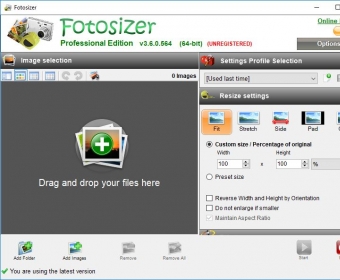
The program's main window is divided into two panels, one for your source photo list and another for configuring the effects and settings to be applied. They, in turn, are grouped by categories, being each one contained on a collapsible menu. The most representative one is probably "Resize" and, of course, it allows you to apply multiple resize schemes to your source photos, like fit, stretch, side, pad and crop. You can specify all the required parameters for each one like the width and height resize percentages or absolute sizes in pixels, centimeters, millimeters or inches, and whether to keep original the aspect ratio or not too. However, you also have at your disposal a lot of presets that help you define your new size in pixels with one click, including such common values like 640x480, 800x600, 1024x768, 1280x800, Widescreen (1920x1200), iPod photo (220x176), iPhone (480x320), HDTV (1920x720 - 1920x1080) and many others, as well as fixed percentages ranging from 10% to 400%. You can also set the program to not enlarge images that are smaller than the specified size. more
Another editing category is "Effects" and allows you to apply one or more of the following effects to your images: Black & White, Negative, Sepia, Lomo, Pixelate and Vignette. Next is "Rotation" category, and it allows you to rotate and/or flip your images in different angles and senses. In the "Miscellaneous settings" category you can change your images' quality either by percentage of the original or by absolute values in DPI, and also you can select whether to keep the original EXIF information (for JPEG files), and the original creation/modification dates. Finally, in the "Destination settings" category, you can set the output folder and even rename your source images and/or convert them to any of the supported formats (BMP, JPEG, GIF, PNG and TIFF), but of course you can also select to keep each file's original format. It's also worth mentioning that, once your create your output configuration using any combination of the mentioned features, you can save it as a profile for quick later use. Also, the program offers you a preview panel where you can check the results of your output configuration for all your source images, before actually applying any changes.
To sum it all up, if you usually need to resize, rotate, flip, rename or apply any of the mentioned functions to multiple image files at once, I would say that Fotoresizer is a must-have for you. Best of all, this tool and all its features are available to you totally free of charge. However, there is also a professional edition of it that offers you even more functions like watermarking, re-coloring and applying round corners to your images. Of course, to use it you need to buy the license and register the program.





Comments (1)